Platform:WinXP,Windows2000,Windows2003,Windows Vista Ultimate,Windows Vista Ultimate x64,Win98,WinME,WinNT 4.x,Win95,Windows Vista Starter,Windows Vista Home Basic,Windows Vista Home Premium,Windows Vista Busi
Icon Processor is a must-have utility for every design enthusiast. It enables you to convert your favorite photos and images into nifty icons. You can use them to personalize your Windows desktop or give a professional touch to your software product.
Icon Processor is a tiny utility for converting photos or images into nifty icons. Anyone who loves doing things with their own hands will find it a valuable addition to their design software kit. Such icons can be used to add a more personal touch to your Windows desktop or give a professional look to your own software product. With Icon Processor, you can convert images that come in different formats, including BMP, JPEG, GIF, WMF and desktop cursors. Added to all this is the additional ability to extract icon files from folders and libraries.
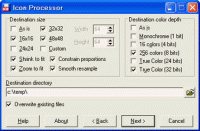
The program has a wizard-style interface that will quickly walk you through all four stages of converting your image into an icon. You start by specifying an image file or an entire image folder to process. Selecting images is a breeze. You can drag and drop them on the program`s interface or add them through the mini-browser with a preview window. Then you need to customize the output settings for your icon. These include icon size, color depth, destination folder and transparency effect. Once you are through these stages, the program will automatically process the file based on your requirements and save it to the specified folder. Whats new in version 3.10: Compatibility with 64-bit Windows OS. Requirements: 32MB RAM, Pentium-233 MHz, 5MB HDD Operating system: WinXP,Windows2000,Windows2003,Windows Vista Ultimate,Windows Vista Ultimate x64,Win98,WinME,WinNT 4.x,Win95,Windows Vista Starter,Windows Vista Home Basic,Windows Vista Home Premium,Windows Vista Busi Limitations: Nag-screen; 3 files can be converted only at once. Release notes: Major Update
See the current day of the week, month, date of the month at a glance from the system tray without hovering the mouse over the clock; Automatic desktop wallpaper changing at pre-determined interval.
Price: $ 19, Rating: 10, Downloads: 158 Download
Image Converter can convert image type and change image size and add watermark and add frame, It supports 14 kinds of image formats, such as BMP, WBMP, JPEG, PNG, TIF, GIF, PCX, TGA, ICO, PSD, JP2, J2K, DCX, and PDF, et al.
Price: $0, Rating: 0, Downloads: 107 Download
Abonsoft True Color Icon Converter can convert any images to true color icons of any size. It can also extract icon from any file or from any folder, then convert to a new icon. It can convert icon to images too.
Price: $24.99, Rating: 8, Downloads: 96 Download

 Icon Processor 3.10 details